Managing Field Sharing Updates

Recently, while working on a site translation project, one of our users reported an odd occurrence. He had disabled content publishing on a content item, yet it still appeared on the public website. Digging into this, we learned that the Do Not Publish flag was set not on the item ("Never Publish"), but on the version ("Hide Version"). As we dug further, we saw that a foreign language version of the item had been accidentally created and published. It was showing English content because the content fields had been defined as Shared. Oddly, Sitecore appeared to render the Shared field values even if no English version had been published, perhaps as a consequence of language fallback configuration. And given we were in the process of preparing the site for translation, it was critical we make all content fields language specific, so they could receive translated content.
Updating field sharing status is not straightforward. When you go to a template field item and attempt to uncheck the field sharing value, you get a warning:
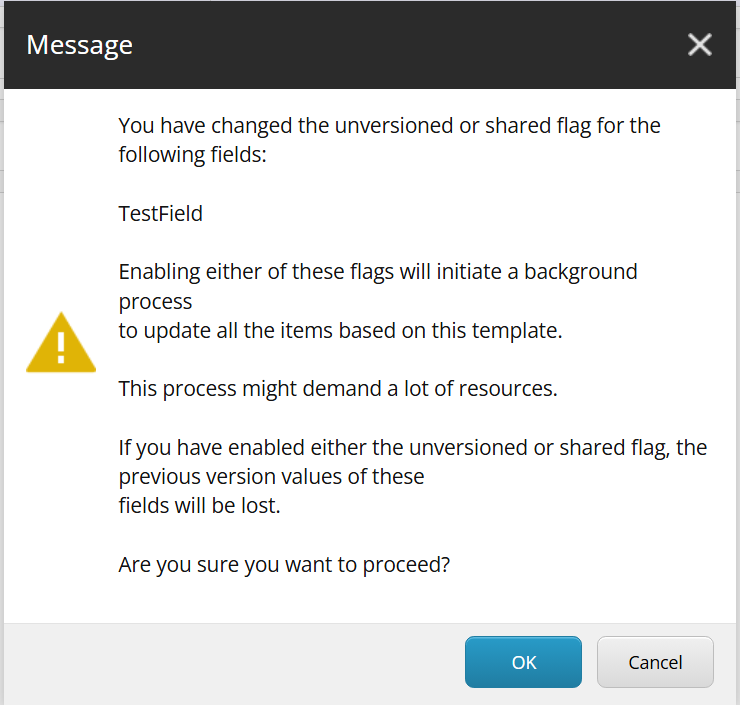
A few things to note here: the warning indicates that moving from versioned to either un-versioned or shared will (logically) result in data loss, but since we needed to move shared to versioned, that was not an issue. But the alert about the background process raised a few questions:
- The warning was displayed by the Content Editor. Would the background process fire from a normal serialization push?
- How impactful would this be to content delivery? Was there a way around this?
The answer to the first question is yes. Changing a field's shared status will cause a data migration event to fire, provided the item:saved event is triggered (you can avoid this by using an EventDisabler object or calling ItemEditing.EndEdit() with silent:true).
You won't find the responsible item:saved event handler in ShowConfig, as it is wired up in code, in Sitecore.Data.Engines.TemplateEngine. A persistent item:saved event handler is wired up once database initialization completes. So any normal call to item saved will invoke this functionality.
Keeping PROD CD happy
Testing showed that this had a very serious impact on database performance, with CPU spiking to near 100% while the updates processed. To avoid affecting site performance, we took advantage of the fact we were using Azure PaaS with slots enabled. We made a static copy of our web database, switched to a CD instance that pointed to the static copy, and then published our updates. Web DB CPU spiked, but CD was not impacted, as it was pointing to a copy. Once database CPU returned to normal, we switched back to the live copy of the web database. Credit to my Velir colleague Nicole DuRand for that simple and economical solution. Once we were done with the updates, she Slacked me, "Feeling pretty fancy with this configuration to maintain uptime!"
Under the hood
INSERT INTO [VersionedFields](
 [ItemId], [Language], [Version], [FieldId], [Value], [Created], [Updated]
)
  SELECT [ItemId], @language, @version, @fieldId, [Value], [Created], [Updated]
  FROM [SharedFields] f
  WHERE f.[FieldId] = @fieldId
  AND (@itemId = @nullId OR [itemId] = @itemId)
  AND [Id] IN (
    SELECT TOP 1 [Id]
    FROM [SharedFields]
    WHERE [ItemId] = f.[ItemId]
    AND [FieldId] = @fieldId
    ORDER BY [Updated] DESC
  )
  AND EXISTS(
    SELECT [Id]
    FROM [VersionedFields]
    WHERE [ItemId] = f.[ItemId]
    AND [Language] = @language
    AND [Version] = @version
)
This gets called for each language and all version numbers (regardless of language) in the database. No itemID is passed (that happens when this code is called for a single item due to a base template change). This code does a bulk insert into the Versioned Field table for every language and version that exists on that item. Since there is, out of the box, no direct index on FieldId in SharedFields, and since this update is executed for all items within a single transaction, it's not surprising that the DB impact is severe.
As the warning message noted, the updates are run in a background process, using ThreadPool.QueueUserWorkItem. This can be bypassed by invoking by using a SyncOperationsContext switcher (e.g. using (new SyncOperationsContext()), which is in fact used by the Sitecore PackageInstaller class.
Calling the updates directly
Since TemplateEngine.ChangeFieldSharing is a public method, you can directly call this to migrate data in advance of changing the field value. But this must be done with great care, as this could result in data loss when you subsequently modify the Shared field value, if you don't run with silent=true or an EventsDisabler, the update logic will clear the migrated values from VersionedFields, and there will be no data in SharedFields to copy from. It's best to simply use the event handler logic and update the Shared flag directly.
Some more background
- This appears to have been fixed in Sitecore 8.2. Prior to that, package installations did not handle shared field changes correctly, per this KB: https://support.sitecore.com/kb?id=kb_article_view&sysparm_article=KB0045873
- Unicorn also had an issue with shared field updates (presumably due to disabling events), but that was fixed with v3.
- I initially dug into this issue in an answer on Stack Exchange.